Reference
Licence and privacy
What you can do without a licence, durations and prices, activation with email and key checked with no connection, and what stays on your computer: your photos are never uploaded.
Procol is proprietary software: without a licence you can try the styles; with a licence you work the whole print and export it without a watermark. This chapter explains what you can do without a licence, what it costs and how to activate it, and above all what happens to your photographs: nothing, outside your computer.
Without a licence: the styles#
Without a licence Procol has no time-limited trial: you can use the styles as they are, for as long as you like. You can:
- open your photos and the test target;
- choose one of the styles and compare them in the proofs;
- look at the print: zoom, the 100% view, compare, zones, histogram;
- open the Stages and read what each style does;
- export your prints.
Two things change compared with a licence:
- adjustments ask for the licence: when you touch the Essentials, the style strength, a control in a Stage or a tool on the print (Crop, Masks, Brush, Spot meter), the Licence window opens and the print stays as it was;
- exported prints come out with a watermark, both from the Export window and from File › Apply to Multiple Files…: a light graph-paper grid over the whole image, with the words ‘PROCOL UNREGISTERED’. The preview inside Procol stays clean.
Buying a licence#
The licence runs for a period of your choice:
Sales open on 1 December 2026. The same offers are on the prices page at procol.it; in the app, the Buy button in the Procol › Licence… window takes you there.
You buy it with the Buy buttons on the prices page: payment goes through Stripe, which handles the card and the receipt.
- No automatic renewal. You pay once for the period you choose; when it runs out, Procol goes back to the styles only and exports carry the watermark again, while your photos and your saved styles stay where they are. To carry on, you buy a new licence whenever you like.
- Refund within 14 days of purchase, with no need to say why: write to help@procol.it (it’s also the contact on your Stripe receipt), and the money goes back to the same card, through Stripe. With the refund the key is switched off: Procol goes back to the styles only.
After you buy, you receive your licence key by email: a long string of text that begins with PROCOL. Keep that email: you’ll need it every time you activate Procol in a new browser or on a new computer.
Activating Procol#
- Choose Procol › Licence…. The same window opens when you touch an adjustment without a licence.
- In Purchase email, type the address you bought with.
- In Key, paste the key you received, all of it.
- Press Activate.
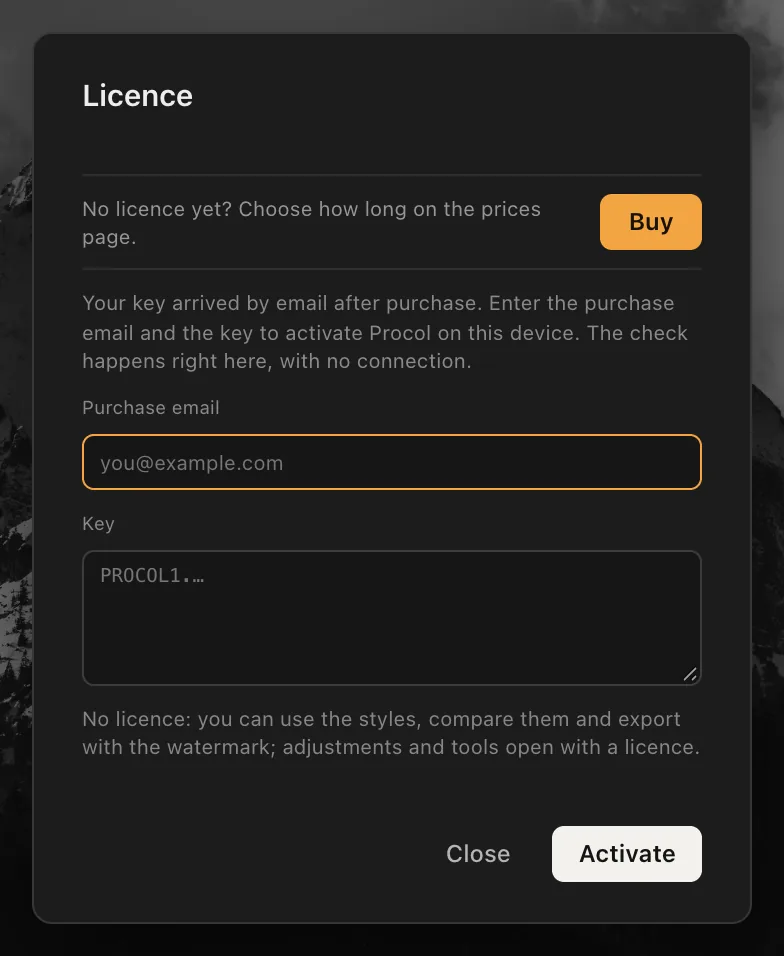
As you paste, the line below the fields tells you straight away whether the key is good. Once the licence is active the window closes, the menu item becomes Licence · Active and exports come out without the watermark.
The key is registered to the purchase email: if the address you type doesn’t match, Procol tells you so and shows you who it’s registered to.
What the status line says#
| Message | What it means |
|---|---|
| No licence: you can use the styles… | There’s no key: styles, comparing them and exporting with the watermark. |
| Licence active · registered to … · N days left | All in order; the line also tells you how long it runs. |
| Licence expired on …: the styles remain | The licence has run out: the styles remain, and exports carry the watermark again. |
| Key not valid | The key is incomplete or damaged: copy it again, all of it, from the email, with no extra spaces. |
| Key not genuine | The key wasn’t issued for Procol. |
| Licence revoked: this key has been refunded | The licence has been refunded and the key is switched off: Procol goes back to the styles only. For any question: help@procol.it. |
You can always see the licence’s state at the bottom left, in the status bar: a green dot with Licensed to: and your email, orange with the date once it has expired, red when there isn’t one. Tapping it opens this same window.
The check happens right here#
Procol checks the key on your computer, with no connection: it doesn’t call any server to activate or to check the licence, so it works offline too, when you travel, in a darkroom with no network.
The key is saved in the browser. So it holds for that browser on that computer: if you also use Procol in another browser or on another device, activate it again with the same email and the same key. There’s no limit on devices: you can activate your licence on every computer and browser you use. But the licence is personal: it can’t be passed on to anyone else, whether sold or given away.
Removing the licence#
In the Procol › Licence… window, Remove deletes the key from this browser: Procol goes back to the styles only. Use it if you’re leaving a computer that isn’t yours.
Your photographs stay on your computer#
It’s a promise Procol’s code keeps in a simple way: your photos have no road out.
- No uploads. The photographs you open are processed in the browser, with your computer’s processor and graphics card. They aren’t sent to any server, ours or anyone else’s.
- No account. You don’t need to sign up to use Procol.
- Face detection stays at home. Face detection in the Portrait Stage happens on your computer. The first time, Procol downloads the face detector from its own site; your photo stays where it is.
- Actions record only adjustments. When you record an action, Procol doesn’t record you, the screen or the camera: only the slider values.
- Files leave only when you export them, to the folder you choose.
What Procol asks of the network#
Procol connects to its own site only to:
- download the app itself, on your first visit and at every update;
- download the included styles;
- check whether there’s a new version (see Questions and troubleshooting);
- download the face detector, the first time it’s needed;
None of these requests carries your photographs or your adjustments.
What stays in the browser#
Procol keeps in the browser, on your computer, what it needs to have your work ready for you: presets, actions, history, preferences, the licence key and a copy of the last ten photos you opened, for File › Open Recent. The full list, and how to delete it, is in Questions and troubleshooting.
A copy of the licence key is also kept in a cookie on the procol.it domain, so that Procol’s other pages, the website and this guide, can recognise that you already have a licence. Like any cookie, the browser presents it to the procol.it sites when you visit them.
A second cookie, procol_lang, only remembers the language you chose (Italian or English) for the app, the site and this guide.
Usage statistics#
To understand how many people visit Procol and which features get used, the website, this guide and the app can use Google Analytics. They do so only if you say yes: on your first visit a notice asks for your permission, with two answers, That’s fine and No, thanks. Until you answer, and if you say no, Google Analytics isn’t even loaded.
If you accept, Google Analytics records:
- the pages you open on the website, in the guide and in the app, and where you came from;
- a few actions: the main buttons on the website, searches in the guide, opening a photo (the file type only), the style you pick among the included ones, exporting (the format only), activating a licence;
- technical details of your browser and the approximate area you connect from.
Your photographs, file names, adjustments, the names of your own styles, your email and your licence key are never sent. We don’t use this data for advertising.
To recognise later visits Google Analytics stores the _ga and ga… cookies in your browser on the procol.it domain, valid for up to two years. The data is processed by Google, including on servers outside the European Union, under its privacy policy.
Your answer applies to the website, the guide and the app, is remembered for six months in the procol_consent cookie, and you can change it whenever you like: with Usage statistics at the bottom of the website and guide pages, or with Procol › Usage statistics… in the app. If you withdraw your consent, the Google Analytics cookies are deleted.
Buying and your data#
Apart from usage statistics, if you accept them, Procol doesn’t collect data about you. The only time any is needed is when you buy, and Stripe handles that: Stripe receives the payment details, under its own privacy policy, and we never see or keep your card number. All we need is the email you bought with, to send you the key and to answer you if you ask for a refund.
Like any website, the servers that host the procol.it pages log the technical details of each request (address, page, time) so they can work; we don’t use them to follow you or for advertising.
For any question about your licence, your purchase or your data: help@procol.it.
Rights#
Procol is proprietary software belonging to Patrizio Anselmi and Matteo Cinquini: the code, the models of the film, the development, the enlarger and the paper, the interface and the texts may not be reused without the authors’ written permission.
The styles are interpretations inspired by the work of the photographers named: their work remains theirs, and none of them took part in Procol.
The photographs you print are yours: you can use them however you like, for work too, and sell the prints. What you can’t do is resell, distribute or pass on Procol itself, or your licence.